

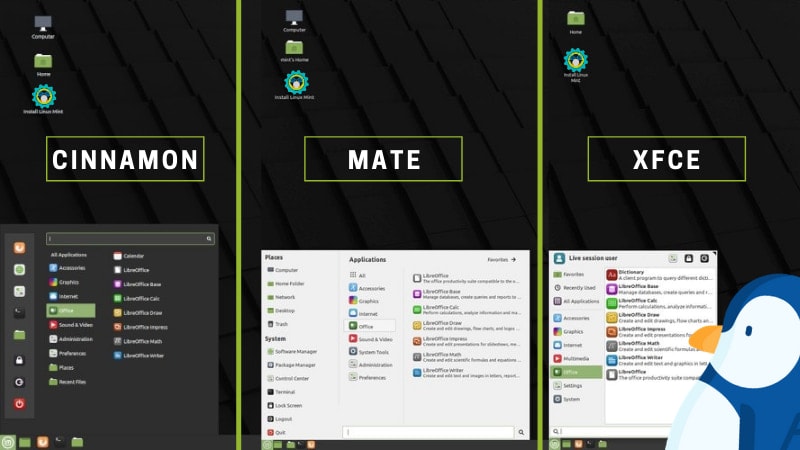
Linux Mint compared: Cinnamon, MATE and Xfce

Why Linux Mint offers three editions
Most Linux distributions ship with a single “main” desktop environment. Mint is different: it officially supports three editions.
Why? To provide the same stable base system, but with three different user experiences, depending on your hardware and preferences.
This flexibility means Mint adapts well to:
- Modern PCs with plenty of resources,
- Older hardware needing balance,
- Lightweight Mini PCs or very old machines requiring extreme efficiency.
👉 Read here: Curioso di provare Linux? Ti spiego tutto in modo semplice – https://incastro.altervista.org/curioso-di-provare-linux-ti-spiego-tutto-in-modo-semplice/
Cinnamon: the modern face of Mint
Origins and philosophy
Cinnamon was born in 2011 as a fork of GNOME 3. The Mint team wanted a more familiar desktop for users coming from Windows, while keeping modern looks and customization.
Main features
- Modern interface: bottom panel, app menu, taskbar.
- Advanced customization: applets, desklets (desktop widgets), themes and extensions.
- HiDPI support for 2K/4K monitors.
- Smooth graphics: effects and animations, well integrated with GPUs.
Performance
- RAM usage at startup: 600–800 MB.
- Needs at least 4 GB RAM, 8 GB recommended for full experience.
- Can be heavy on entry-level Mini PCs or old machines.
Pros and cons
✅ Sleek and modern, very intuitive for Windows users.
✅ Rich in features and regularly updated.
❌ Heavier than MATE or Xfce.
❌ Not ideal for old or very low-powered hardware.
👉 Best for: recent PCs and mid/high-end Mini PCs, or anyone wanting the most modern Mint experience.

MATE: tradition and balance
Origins and philosophy
MATE is the continuation of GNOME 2, forked when GNOME 3 switched to a new interface. Its purpose: keep the classic desktop metaphor alive, with panels, menus and simplicity.
Mint includes MATE as a middle ground: lighter than Cinnamon, more feature-rich than Xfce.
Main features
- Traditional desktop: top/bottom panels, simple app menu.
- Moderate resource use: runs well on PCs with 2–4 GB RAM.
- Stability: mature and reliable, with conservative updates.
Performance
- RAM usage at startup: 500–600 MB.
- CPU load lighter than Cinnamon.
- Runs smoothly even on 10-year-old PCs.
Pros and cons
✅ Balanced between lightness and functionality.
✅ Stable and robust, great for productivity.
✅ Familiar to long-time Linux users.
❌ Less modern look compared to Cinnamon.
❌ Limited customization options.
👉 Best for: users who want stability and usability without wasting resources.
👉 Read here: Installare Linux da chiavetta USB: guida pratica e veloce – https://incastro.altervista.org/installare-linux-da-chiavetta-usb-guida-pratica-e-veloce/

Xfce: extreme lightness
Origins and philosophy
Xfce is one of the oldest Linux desktop environments still active. Its mission: be lightweight, fast and stable, avoiding unnecessary eye candy.
Mint offers Xfce to cover users with low-spec hardware or those who want maximum efficiency.
Main features
- Very low resource usage: among the lightest desktops available.
- Simple interface: customizable panel, straightforward menu.
- Rock-solid stability: slow development, but extremely reliable.
- Minimalist approach: fewer effects, only the essentials.
Performance
- RAM usage at startup: 400–500 MB (sometimes less).
- Very responsive even on PCs with just 2 GB RAM.
- Perfect for “resurrecting” old hardware or office PCs.
Pros and cons
✅ Extremely lightweight, runs everywhere.
✅ Fast and responsive.
✅ Ideal for old PCs or low-power Mini PCs.
❌ Very basic look compared to Cinnamon.
❌ Few advanced features out of the box.
👉 Best for: aging PCs, entry-level Mini PCs, or users who want maximum speed with minimal resource use.
👉 Read here: Mini PC con Linux: pro e contro nel 2025 – https://incastro.altervista.org/mini-pc-con-linux-pro-e-contro-nel-2025/

Cinnamon vs MATE vs Xfce: direct comparison
| Feature | Cinnamon | MATE | Xfce |
|---|---|---|---|
| Release year | 2011 (GNOME 3 fork) | 2011 (GNOME 2 fork) | 1996 |
| Look | Modern, Windows-like | Classic, traditional | Minimal, basic |
| RAM usage | 600–800 MB | 500–600 MB | 400–500 MB |
| Target hardware | Modern PCs / powerful Mini PCs | Mid-range PCs | Old PCs / entry-level Mini PCs |
| Customization | High (themes, applets) | Medium | Low |
| User experience | Full, rich in features | Balanced | Minimal and fast |
| Updates | Heavily maintained by Mint team | Conservative but steady | Slow, stability-focused |
Which edition should you choose?
- Cinnamon → for modern PCs and users wanting a feature-rich, Windows-like desktop.
- MATE → for stability, tradition and moderate hardware use.
- Xfce → for old PCs, entry-level Mini PCs or extreme speed needs.
Mint’s strength is choice: you can try them all and stick with what works best for your daily workflow.
FAQ
Is Cinnamon too heavy for Mini PCs?
It runs fine with 8 GB RAM. On 2–4 GB devices, MATE or Xfce are better choices.
Can I install multiple desktops?
Yes, but it may cause clutter (duplicate menus, themes). Safer to stick with one.
Which edition is updated most?
Cinnamon, as it’s Mint’s flagship desktop. MATE and Xfce also receive regular updates.
Which is closest to Windows?
Cinnamon, with its taskbar, menu and panel setup.
Which is fastest on old hardware?
Xfce, by far the lightest and most responsive.